Beer Alchemy Integration

Note from future Sean: this is certainly dead code 10 years later; leaving here for reference in case it's somehow useful.

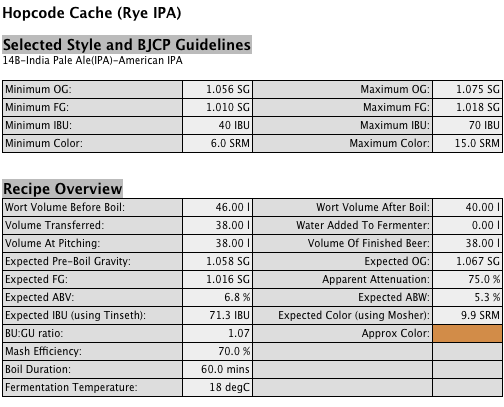
As I mentioned in my previous post, my beer recipes are now online.

I've had several people ask me how this is done, so I think a post is in order.

While it's entirely possible to brew beer at home without any fancy gadgets, there are several tools I use (such as my refractometer) that make the process easier, more controlled, or both. Brewing software is one of the few instruments that I'm not sure I'd want to brew without. I use a Mac, primarily, so Beer Alchemy (BA) is the obvious choice for recipe formulation, calculation, and logging.

BA has its own HTML export mechanism for recipes, and I used this for quite a long time, but I was never really satisfied with the results. The markup was hard to style, contained a lot of clutter (occasionally useful, but often redundant information such as style parameters), and simply didn't fit well with the rest of my site.

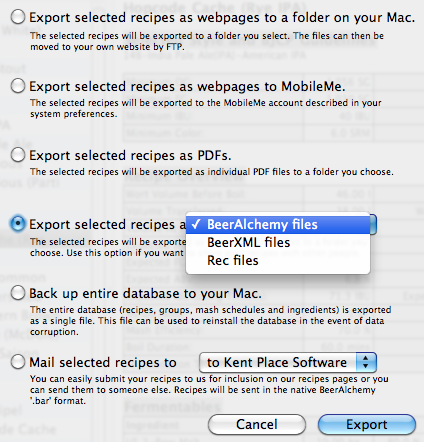
You can also export from BA in PDF (not suitable for web publishing), ProMash's binary recipe format (a pain to convert, although there do seem to be some tools to help with this), BeerXML (normally the most accessible, but in my opinion, a poorly-designed XML format), or in BA's native .bar ("Beer Alchemy Recipe") format, which is what I chose.

The bar format contains a property list, similar to those found throughout Apple systems. Property lists are either binary or XML (but the XML is very difficult to work with using traditional tools because of the way it employs element peering instead of a hierarchy to manage relationships). Luckily, I found a project called CFPropertyList that allows for easy plist handling in PHP. (I even contributed a minor change to this project, a while ago.)

Once you've run the .bar file's contents through CFPropertyList, layout is very simple. Here's most of the code I use to generate my recipes:

<?php
$beerPath = __DIR__ . '/../resources/beer/';

$recipes = apc_fetch('seancoates_recipes');
$fromCache = true;
if ($recipes === false) {
	$fromCache = false;
	foreach (new DirectoryIterator($beerPath) as $f) {
		if ($f->isDot()) {
			continue;
		}
		if (substr($f->getFilename(), -4) != '.bar') {
			continue;
		}
		$cfpl = new CFPropertyList($beerPath . '/' . $f->getFilename());
		$recipe = $cfpl->toArray();
		$title = $recipe['RecipeTitle'];
		$recipes[self::slugify($title)] = array(
			'title' => $title,
			'content' => $recipe,
		);
	}
	asort($recipes);
	if ($recipes) {
		apc_store('seancoates_recipes', $recipes, 3600); // 1h
	}
}

In addition to displaying the recipe's data, I also wanted to show the approximate (calculated) beer colour. Normally, beer recipes declare their colour in "SRM" (Standard Reference Method). There's no obvious, simple, and direct way to get from SRM (which is a number from 0 to 40—and higher, but above the mid 30s is basically "black") to an HTML colour.

I found a few tables online, but I wasn't terribly happy with any of them, and keeping a dictionary for lookups was big and ugly. I like the way Beer Alchemy previews its colours, and since it has HTML output, I emailed the author to see if he'd be willing to share his algorithm. Steve from Kent Place Software graciously sent me an excerpt from his Objective C code, and I translated it to PHP. This might be useful for someone, and since Steve also granted me permission to publish my version of the algorithm, here it is:

<?php
/**
 * Calculate HTML colour from SRM
 * Thanks to Steve from Kent Place Software (Beer Alchemy)
 *
 * @param float $srm the SRM value to turn into HTML
 * @return string HTML colour (without leading #)
 */
public function srm2html($srm)
{
	if ($srm <= 0.1) { // It's water
		$r = 197;
		$g = 232;
		$b = 248;
	} elseif ($srm <= 2) {
		$r = 250;
		$g = 250;
		$b = 60;
	} elseif ($srm <= 12) {
		$r = (250 - (6 * ($srm - 2)));
		$g = (250 - (13.5 * ($srm - 2)));
		$b = (60 - (0.3 * ($srm - 2)));
	} elseif ($srm <= 22) {
		$r = (192 - (12 * ($srm - 12)));
		$g = (114 - (7.5 * ($srm - 12)));
		$b = (57 - (1.8 * ($srm - 12)));
	} else { // $srm > 22
		$r = (70 - (5.6 * ($srm - 22)));
		$g = (40 - (3.1 * ($srm - 22)));
		$b = (40 - (3.2 * ($srm - 22)));
	}
	$r = max($r, 0);
	$g = max($g, 0);
	$b = max($b, 0);
	return sprintf("%02X%02X%02X", $r, $g, $b);
}

A new seancoates.com

Over the past few weeks, my business partner Cameron and I have spent evenings, late nights, and weekends (at least partially) working on a much-improved seancoates.com.

If you’re reading this via my feed, or through a syndication outlet, you probably hadn’t noticed.

The primary goal of this change was to reduce (hopefully even remove) the ugliness of my main presence on the Web, and I’m very happy with the results.

In addition to making things look nicer, we also wanted to improve the actual functionality of the site. Formerly, seancoates.com was a blog, with a couple haphazard pages thrown in. The new version serves to highlight my blog (which I fully intend to pick up with more frequency), but also contains a little bit of info about me, a place to highlight my code and speaking/writing contributions, and a good place for me to keep my beer recipes.

Cameron came up with the simple visual design and great interaction design, so a public “Thank You” is in order for his many hours of thought and contribution. Clearly, the ugliness reduction was his doing (due to my poorly-functioning right brain).

I’m very happy with how the site turned out as a whole, and thought I’d outline a few of my favourite bits (that might otherwise be missed at first glance).

URL Sentences

The technique of turning URLs into sentences was pioneered by my friend and colleague Chris Shiflett. Cameron (who shares studio space (and significant amounts of beer) with Chris) and I both like this technique, so we decided to implement it for my site.

The main sections of the site are verbs, so this was pretty easy (once we decided on proper nomenclature). Here are a few examples:

  • seancoates.com/blogs – Sean Coates blogs…
  • seancoates.com/blogs/about-php – Sean Coates blogs about PHP (my “PHP” blog tag)
  • seancoates.com/brews – an index of my published recipes
  • seancoates.com/brews/coatesmeal-stout – the recipe page for Coatesmeal Stout

To complement the URLs, the page title spells out the page you’re viewing in plain language, and the visual site header indicates where you are (while hopefully enticing you to click through to the other sections).

Moving my blog from the root “directory” on seancoates.com to /blogs caused my URLs to break, so I had to whip up yet another bit of transition code to keep old links functioning. Even links on my original blog (which was hosted on blog.phpdoc.info) should still work. If you find broken links, please let me know.

Vertical Content Integration

My “/is” page contains feeds from Twitter and Flickr.

The Twitter integration was pretty simple; I use the JSON version of my user feed, but I didn’t want to include @replies, so they’ve been filtered out by my code. If the fetch was successful, the filtered data is cached in APC for a short period of time so that I’m not constantly hammering Twitter’s API.

Flickr’s integration was also very simple. After a run-in with some malformed JSON in their API, I decided to integrate through their Serialized PHP Response Format. The resulting data is also cached in APC, but for a longer period of time, as my beer tasting log changes much less frequently.

Code Listings

Displaying code listings on a blog isn’t quite as easy as it sounds. I recently had a discussion with a friend about redesigning his site, and he was considering using Gist from Github’s pastebin-like functionality. Doing so would have given him easy highlighting, but one thing he hadn’t considered was that his blog’s feed would be missing the embedded listings (they come from a third party, and wouldn’t actually appear in his feed’s data stream).

Another problem we faced was one of space. While I often try to keep code to a maximum of 80 (or slightly fewer) characters wide, this isn’t always possible. Injecting a line break into the middle of a line of code is risky, especially for things like SSH keys and URLs. This problem is usually solved by setting the content’s CSS to overflow: scroll, but that littered Cameron’s beautiful design with ugly platform-specific scroll bars. “Clever” designers and developers sometimes overcome this by implementing “prettier” scroll bars, but I’m strongly against this behaviour, so I wouldn’t have it on my site.

I’m quite happy with our eventual solution to this problem. Now, when a blog post contains code that extends beyond the normal width of the blog’s text, the right-most part of the text fades to white, and the listing is clickable. Clicking expands all listings on the page to the minimum width that will accommodate all embedded code.

Here's some example code that stretches much wider than this column would normally allow.
Injecting line breaks is dangerous. Here's why: http://example.com/obviously/not/a/sentence/url
Breaking that in the middle is far from ideal.

jQuery saved me hours of development work here, and I couldn’t recommend it more highly. Highlighting is provided by a plugin that I wrote a couple years ago. It uses GeSHi to highlight many languages. I’ve never been very happy with GeSHi’s output, but it’s Good Enough™ until I can find time to implement a better solution that uses the Tokenizer for PHP.

Software

In addition to PHP, this site integrates a custom version of Habari, with our own theme and plugins. One of those plugins allows me to keep my blog posts in HTML files in my Git repository, to make for much easier editing, greping, etc.

Everything except /blogs was built within the Lithium framework. It handles all of the boring stuff like controllers, routing, and templates, so I didn’t have to write that code myself (which I find incredibly boring these days).

Hashgrid was invaluable in ensuring that the site aligns with a visual grid (again, thanks to Cameron’s meticulous expertise). Pressing your g key will show the grid he used. I even made a few improvements to how Hashgrid works, which I hope to eventually see in the master branch.

Goodbye, OmniTI

Today is my last day at OmniTI.

From an email I just sent out to my soon-to-be-past colleagues:

“I sincerely wish you continued success as a company, and also as individuals who truly make up a significant portion of the best people in this industry. There are many things that OmniTI does very well, and I won't hesitate to refer business your way when the situation arises.

This past year and a half (or so) has been a bumpy road, but I'm absolutely sure I will look back on my time with OmniTI as a net-positive. Thank you all for supporting me and my team with our sometimes-(absurd | stupid | obvious | amateur | tough) questions and requests.”

The road ahead for OmniTI doesn't look nearly as bumpy, but after a very long period of thought, I finally decided to pursue other options around 6 weeks ago, and will now join the ranks of the funemployed.

Thanks for the opportunities, experience, insight, and tough problems, OmniTI.

2010 will be a great year. I'm already excited about some of the prospects that are in my future.

Bonus points if the title of this post seems familiar. (-:

Horrible Support

I fully acknowledge that this is a rant. If you're not into that sort of thing, scroll on by—nothing to see here. I do have a point at the end of the (long) narrative(s), if you do manage to read the whole thing, though.

Technical customer service sucks—at least for people who have the slightest clue about the technology they're calling about.

Videotron

Today, I spent all afternoon (and this evening, and this will carry into tomorrow, maybe Friday) without Internet service. After lunch, I was sitting at my dining room table with the laptop, where I have a clear view of the telephone/hydro/cable pole across the street. This pole services my house. I glanced up and noticed a Videotron (my cable provider) truck, and its driver up in the bucket, doing something to the wires.

I jokingly wrote this in the work IRC channel:

[14:08] sean: expecting internet to drop any second
[14:09] sean: there's a cable guy on the pole across the street

I was disconnected within seconds. I looked up again, and the truck was pulling away.

Thinking it might just be a one-off desynchronization, I reset my cable modem, and it didn't reconnect.

I hate calling technical support. It's always an absolute last resort. If I get to the point of desperation that I actually need to call tech support, you can be absolutely sure that I've fully exhausted every possible solution on my side. This was obviously related to the careless technician formerly of the pole across my street, and clearly not a problem on my side.

I waded through the phone menus, and got to speak to a support agent. After confirming my super-secret birth date with him to verify my identity, he asked me tell him what was wrong.

"One of your technicians was on the pole across the street from my house. My connection was working perfectly before he arrived. When he left, my modem wouldn't sync. He obviously broke something, could you please send him back?"

I was asked to reset my modem. I explained that I already tried this, and it still wouldn't sync. I was then asked to reboot my computer. I explained, calmly, that nothing has changed on my side, and the modem simply wouldn't connect. Nothing on my side of the modem mattered if the modem wouldn't connect. He offered to check the files to see if anyone else in my neighbourhood was complaining of outage, noticed that there was a technician in the area, and that he was fixing a problem that was reported earlier this morning.

I chuckled and told my support agent that he probably fixed my neighbour's problem, but in the process managed to seemlingly knock the pole side of my connection out. The agent told me that since there was a reported outage in the area already, he couldn't send a technician but there was someone working on it. I didn't believe him that someone was still working on it, since the truck pulled away. I was right.

It was obvious to me that the agent wouldn't understand Occam's razor, so I didn't bother.

Three hours later (5:30pm), I called my ISP again. I swam through the sea of menus, and spoke with a technician. I had to explain the whole situation again. He asked me to reset my modem, reboot my computer, and wanted to know if my router had changed configuration. I, again, calmly explained that my router configuration is moot if the modem won't sync. After checking what was presumably a connection diagnostic on his side, and once again verifying that my neighbours weren't having trouble, he had a eureka moment and informed me that there was a technician in my neighborhood repairing a problem earlier that day. I reminded him that I just told him the same thing (slightly less calmly—but not rudely—this time), and he admitted defeat and agreed to send a technician to my place. "He'll be there by 8pm."

I fully expected to have to call Videotron back at 8:05pm, and I was right. So, I tried resetting my modem one last time, then called support. The menus were getting easier. "Please choose from the 7 follo..." *keypad 2* I got a technician, confirmed my birthdate before he even asked, and started explaining that the technician didn't show up. He was confused. I explained the whole problem, and concluded by repeating that the technician didn't show up. "Oh, I see that a technician is supposed to visit you." Sighing, I said "Yes, that's why I'm calling you. He was supposed to be here by 8. It's after 8 now."

The agent said he'd have to call the technician's dispatcher to see what's up. Hold music. (Aside: the hold music gets interrupted by messages that explain how to fix your own problems by resetting your modem, but they warn not to do this if you're using Videotron's VOIP service (-: ) The agent comes back and starts grilling me about not being home when the technician got here, so I missed him. I was home the whole time. In fact, I spent the 2.5h checking the yard every time I heard a car drive by. The agent insists that the technician was here, and I wasn't. I insist that I was here, and the technician didn't want to come out after 8pm on a cold, wet autumn night, so is saying that I wasn't home. Stalemate.

The agent had an idea. Technicians are supposed to leave cards when they call and the customer neglected to be home to receive them. I checked both doors. No card. Nothing. This convinced the agent that the technician wasn't here, somehow. He offered to schedule a new appointment for tomorrow. I remind him that this isn't my fault in any way, and they should just come fix it now. That's not possible. I can schedule for one of three blocks, tomorrow. 7am-12pm, 12pm-5pm, or 5pm-8pm. None of these work for me. I have to take my daughter to school in the morning. I have tomorrow off, and I have errands that need to be run, so the 5-hour afternoon block is out, and I'll be out in the evening. Friday is the same situation. They require me to be home for FIVE hours just so they can fix a problem that I didn't cause.

He said it's impossible for them to fix the problem if I'm not going to be home. I know this isn't true, but I'm sure it's a policy on their side, so I didn't fight with the poor agent too much. "He was perfectly capable of breaking my service without coming into my house."

So now I'm in Internet limbo. I don't know when/if it will be fixed. I'm basically screwed until I can find a 5 hour window where I'll be home and when I don't need to be online. Normally, I'd just tell them to fix it or cancel my account, but these guys are the least-worst choice for broadband in Montreal. The only other option is DSL from Bell. (Not quite true: there are other options like 3G access from Rogers (another evil), Satellite (impossible latency), and resellers that use Bell's and Videotron's infrastructures; none of which are actually viable.)

Bell

Before getting Videotron at the house, I had DSL from Bell. I canceled them due to their incompetence.

One day, after a few months of good service, I started getting >50% packet loss. I checked everything on my side. It was fine. This was a problem with my DSL connection itself. So, I gave in and called tech support.

The usual annoying questions ensued. You'd think that if I said "I'm measuring 53% packet loss" it would automatically qualify me for escalation beyond the "is your computer on?" type of questions. Not so.

I rebooted. I bypassed the router. I installed their stupid PPPOE software (which was not necessary, but I obliged anyway). Magically, this didn't fix my packet loss problem. The agent acknowledged that they weren't getting a very good signal to my DSL modem. Then he asked me a stupid question. "How long is the telephone cable that connects your modem to the wall?" I replied with the truth "I don't know, offhand. I guess eight feet." Little did I know that this was a trick question. The correct answer to cable length queries was about to be revealed: six feet. "What?" "It needs to be six feet long." "Uh. No. It doesn't." "Yes, sir, with a longer cable, you will introduce noise, and you'll get packet loss." This was humourous but also frustrating. I asked the agent if the electrons magically changed into some sort of noise-proof signal upon entering the wall, as it was the same type of cable on both sides of the socket. He wasn't amused.

"Hold on a sec. *pause* OK. Now it's six feet." He was still unamused. "Sir, you can't just tell me it's six feet." "Oh, no. I wouldn't do that. It's six feet now." If you make up lies about things like this, it's fair for me to play your game.

He finally gave in and agreed to send a technician to fix the problem. The first appointment they had was four days later. Yes. Four days. I insisted that there must be an appointment before that. They disagreed. I pressed, anyway "Do you know that I can sign up for service with Videotron faster than you can get a technician out here to solve your DSL problem?" They held their ground, so I signed up with Videotron and canceled. Videotron has worked well up until today.

I hate having to manipulate tech support to solve a real problem, though. This reminds me of how I've had to deal with Dell in the past.

Dell

Around five years ago, I had a Dell laptop. After a few months of use, the power connector on the motherboard came loose, and it would only charge sporadically. We had purchased the super-mega-extended-warranty that Dell offers, so when I called tech support (obviously, this was not a problem I could solve on my own, or I would have), and convinced them that the hardware needed to be fixed, they sent a technician to my office the next morning (super warranty to the rescue).

The technician replaced the motherboard on my laptop. When he put everything back together, I gave it a quick test and was satisfied, so I thanked him and signed off on his work. Within an hour or so, I noticed that my computer was underperforming. Everything was slow.

To make my subjective observation into objective evidence, I found some online benchmarks for my laptop's model, and ran the same benchmarks locally. I was right: it was underperforming by around 50%.

I called tech support again, and explained the whole situation: a technician replaced my motherboard that day, and afterwards, my computer was performing much worse than before. Obviously something was wrong with the new motherboard. "Obviously" has a much different meaning to me than to Dell's technical support. I was forced to go through a procedure of rebooting multiple times, re-seating RAM, resetting my BIOS, explaining that I couldn't boot Windows into safe mode because I wasn't running Windows (this further confused the agent, and almost jeopardized my ability to actually get support). I was around 45 minutes into the call at this point, and I had no way of convincing the agent that the motherboard replacement was the obvious culpit. Her flow chart of how to solve my problem didn't include an actual solution to my problem, and every branch of her problem-solving scripts ended up in fruitless frustration.

Finally, she asked me to run the full Dell diagnostic tests. This came on a CD with the laptop, and I'd run it once before just to see what it did. It took several hours to run the full suite. She was ready to be through with me, rescued by an impossibly long procedure, but I wasn't ready to give up that easily. So, I dug out the disk, and asked her to "please hold." At this point, I was quite bored, and had to amuse myself, so I'd pick up the phone every ten minutes or so and ask her entertaining, yet covertly mean questions about her job. "Out of curiousity, is your performance judged by your average call duration?" "Will this 90 minute call negatively affect you?"

Around two hours in, I decided to give up. It was obvious that she didn't have a script that would allow her to turn my problems into a new visit from their technicians, no matter how many times I insisted that the motherboard was to blame. I had places to be, so I thanked her for her help and hung up without any sort of solution.

The next morning, I desperately called the technician directly. I had his number because Dell outsources on-site work to third parties, and I had to call him to schedule the first meeting. I explained the whole situation, from the slowness to my useless call with Dell tech support. He was sympathetic, but insisted that there was no way he could help without a work order. I understood, but asked him how he might suggest I actually solve this problem. "Well, if your computer has no power at all, then they'd have to replace the motherboard again." A lightbulb turned on. "I understand! Thank you!"

So, I called Dell tech support again, and played dumb. When asked to describe the problem, I said "my computer won't turn on." "It says in your file that your computer is running slowly..." "Yes, that was yesterday. Today, it just doesn't work." A few minor exercises involving removal and replacement (or so they thought) of the battery, they broke the bad news "I'm sorry sir, but we're going to have to replace your motherboard." I feigned sadness, and got a new work order number, and was told a technician would call.

The technician replaced my motherboard that afternoon, and everything returned to normal. I even had a working power connector after the ordeal.

Apple

The only time I can remember actually having good technical support from any company with more than 100 employees is from Apple.

This might read like a fanboy remark, but it's true. The few times I've had to visit the Apple Geniuses at their stores, they've actually listened to my problem, acknowledged that I've probably already tried the obvious solutions, and treated me like an actual person, and not just someone they want to get out of their queue as quickly as possible to improve their call time averages.

I've been genuinely impressed with them.

I wish more companies could be like Apple in this regard. It would have been trivial for Videotron and Dell to acknowledge that—in all likelihood—the problem was caused by obvious circumstances. It's truly nice to not be asked to "reboot, and call back" when talking with technicians who actually make an effort to understand and solve the problem.

In the meantime, I'll keep "borrowing" my neighbour's open wifi. Thanks, "default"!
UTF: WTF?

Note: This article first ran in php|architect in March 2008, while I still worked at MTA. Marco (the publisher, and my former colleague) has graciously agreed to allow me to republish this in a more public forum. I've wanted to link a few people to it in the past few months and until now that was only possible if they were php|architect subscribers. That said, if you're into PHP, you really should subscribe to php|a.

As you might know, one of my roles at php|architect is to organize and manage speakers (and their talks) for our PHP conferences.

A while back, PHP 6's main proponent, Andrei Zmievski, submitted a talk that we accepted, entitled "I ♥ Unicode, You ♥ Unicode." When we selected the talk and invited Andrei to attend the conference, he accepted and humorously suggested that we pay special attention to the talk's heart characters when publishing details on the conference website and in other promotional materials. I took his suggestion as wise advice, and double checked the site before releasing it to the public—it worked perfectly.

Within a few hours of publication, Andrei dropped me a note indicating that I hadn't heeded his warning, and that the s weren't showing up properly. The problem turned out to be a bug in a specific version of Firefox, and I believe we resolved it by employing the &hearts; entity. This ordeal, while minor, was my first taste of how bad things would become.

If I had to guess, I would estimate that I've spent somewhere in the range of 40 hours wrangling UTF-8 in the past 3 months, which is not only expensive for my employer, but also disheartening as a developer who's got real work to do. Admittedly, this number is inflated, due to the heavy development cycle we completed with the launch of our new site. As time goes on, though, I don't see this situation improving in the short term (though, if we were to glimpse much further into the future, I'm sure we'll eventually consider this a solved problem).

The main problem with using Unicode, today, is that it's partially supported by some parts of any given tool chain. Sometimes it works great, and other times—due to a given piece of software's lack of implementation (or worse, a partial implementation), human error, or full-on bugs—the chain's weakest link shatters in a non-spectacular way.

As any experienced developer knows, having the weak point of a process collapse is a normal part of building complex systems. We're used to it, and we usually manage this by making the systems less complex, by eliminating the parts that are prone to collapse, or by fixing the broken parts. When implementing a system that may contain Unicode data, today, we're challenged with many potential points of failure that are often difficult to identify, and nearly impossible to replace.

To illustrate, consider an overly simplified web development work—and content delivery—flow: developer creates a file, developer edits file, developer uploads the files to the web server, httpd receives a request from a browser, httpd passes the request to PHP, PHP delivers content back to httpd, httpd delivers content to the visitor's browser. If a single part of this flow fails to handle Unicode properly, a snowball effect causes the rest of the chain to fail.

A more typical flow for me (and our code) goes something like this: create file, edit file, commit file to svn, other developers edit file, others commit to svn, release is rolled from svn, visitor browser requests page, httpd parses request, httpd delivers request to PHP, PHP processes request, PHP (client) calls service to fulfill back-end portions of request (encodes the request in an envelope—we use JSON most of the time), PHP (service) receives request, service retrieves and/or stores data in database, service returns data to PHP client, PHP client processes returned data and in turn delivers it to httpd, httpd returns data to browser.

If you'll bear with me for one last list in this article, that means that any (one or more!) of the following could fail when handling unicode: developers' editors, developers' transport (either upload or version control), user's browser, user's http proxy, client-side httpd, client-side PHP, client-side encoder (JSON), service-side httpd (especially HTTP headers), service-side decoder, service-side PHP, service-side database client, database protocol character set imbalance, database table charset, database server, service-side encoder, client-side decoder, client-side PHP (again), client-side httpd (including HTTP headers, again), user's proxy (again), and user's browser (again). I've probably even left some out.

As you can see, there are so many points of failure here, that determining the source of an invalid UTF-8 character is torturous, at best.

Recently, I had to wrestle UTF-8 monsters. In my case, it was a combination of user (me) error and an actual bug in PHP, but it was so non-obvious that it caused most of my day to melt away, trying to resolve the issue. In my case, I had decided to split a file that contained UTF-8 characters into two files. By default, my editor of choice creates new files using my system character encoding—which happened to be Mac-Roman because I hadn't changed it from Leopard's default. The original file was UTF-8, and the characters displayed normally in the new Mac-Roman file. However, when the data was passed to PHP's json_encode function, the string was arbitrartily truncated, due to a PHP bug .

Because the script that triggered the bug pulled the data from a database, and the data was inserted by another script—the one with the broken encoding/characters—it took me entirely too long to trace it back to the change I'd made to that now-split file. For a while, I even thought that MySQL was storing the data poorly because we'd had problems with that before, and also because the database client I was using that day was reporting the characters improperly, due to its own encoding issues. I believe my blood pressure skyrocketed to dangerous levels, that afternoon.

Universal Unicode support is going to be a long uphill battle. I'm not sure I'm ready for it, but I hope it's worth it, nonetheless.

More Web of Trust Thoughts

A while back, I blogged about trust on the web, and how there are a lot of assumptions made by content providers that simply don't carry over to end users, or are just a small (but important) step from being good practices.

Yesterday, at $work, we were talking about something that lead to a discussion on SSL, and how I think that most sites, even if they don't contain sensitive information should be available by https—even if the certificate is self-signed.

Chris respectfully (I think (-; ) disagreed with me saying that certificates that are not trusted a user's browser are as bad, or even worse than not allowing SSL at all. His theory—and I'm sure he'll correct me if I'm misrepresenting him—is that offering this type of unverifiable certificate is not only useless, but harmful to users because there's a false sense of security. My retort, though not well received, is that users of modern browsers (Firefox at least) will be notified when a self-signed certificate that they've accepted has changed. This at least allows the user to verify when something is amiss. His rebuttal was that there's no way for the user to tell which certificate is the "good" one, and which is the "bad" one, and I can see his point.

We had a discussion on DNS and how we trust it for a lot of things that we shouldn't, even though we don't want to... especially given the recent problems with DNS. In the end, we all agreed that putting something like http://omniti.com/ on self-signed https serves no practical value as users will a) never use it, b) not know how to verify the certificate, and c) will get confused by their browser warning them about security problems.

This lead to a few other branches of thinking about SSL. The first was a question Chris asked us "how do access your online banking?" clarifying with "how do you get to the login page?" A few of us (myself included) answered "bookmark" while others said they hit their bank's main domain either from URL history or manually, and clicked through from there. Chris's point was that most users visit http://bank.example.com/ and are somehow directed their https login page. I checked my bank, and bad things happen:

  • visit http://www.royalbank.ca/
  • click "online banking", which links to http://www.rbcroyalbank.com/STRINGHERE/redirect-bank-hp-pagelink-olb.html
  • which redirects, via META tag to: https://www1.royalbank.com/cgi-bin/rbaccess/RESTOFURLHERE
  • user is presented the login form (in https)

My bookmark is the https://www1.royalbank.com/... page, so I feel relatively safe, but let's look at the bad things that happen here:

  • User visits one domain (HTTP, not secure)
  • User is _silently_ redirected to another domain on HTTPs

Why are these bad? Well, aside from the possible confusion of getting bumped from royalbank.ca to rbcroyalbank.com to royalbank.com, the user's chain of trust breaks down when they visit http://royalbank.ca/. http—no "s". If this site was compromised, the user would never know (without careful URL confirmation at the https destination) that s/he was not maliciously redirected to https://www1.roya1bank.com/ (note "L" is "1" (one) in my bad-guy example). Phishers could easily get a SSL certificate for roya1bank.com.

That got me thinking a bit about the SSL certificate acquisition process. I'm sure some of the really high-end SSL certificates still come with human validation (a real person looks at the application and makes a real decision about granting the certificate; in the case above, hopefully this would have been caught). Most certificate signing I've seen recently is based on proven ownership of the domain in question. So, as I say, it's trivial for me to go register a domain that LOOKS like a bank. Sure, I'd still have to compromise either the http server or DNS that points at the server, but Kaminsky demonstrated that this isn't so hard (or wasn't until just a few weeks ago).

Let's take it a step further back. If bad guys can compromise DNS, which is inherently insecure (not SSL, no trust model other than IP address, and it runs on UDP(!)), then surely they can trick your the certificate authority's SMTP server to deliver mail to another mail exchanger, right?

  • bad guy targets example.com poisons the certificate authority's DNS for example.com to point MX at an IP controlled by bad guy
  • bad guy generates a certificate signing request (CSR) and send it to the certificate authority (CA), "From" bob@exmaple.com
  • CA receives the CSR and verifies with whois that the contact for the domain is bob@example.com
  • CA signes the CSR and returns the certificate to bob@example.com (either by mail or through a web interface)
  • bad guy is now in posession of a perfectly valid and trusted http://example.com/ SSL certificate

Scary. You must be thinking that CAs probably have a more secure DNS setup and wouldn't get poisoned (as easily). I believe that to be somewhat true. Let's say it's absolutely true: the CA has 100% perfectly secure DNS. Ok, we'll need to go one step further back:

  • bad guy poisons the DNS for the target's less secure $20/month ISP, example.com, to redirect the MX for example.com to a different server
  • bad guy visits example.com's registrar's web interface and indicates that he has forgotten his password
  • registrar generates password reset URL/instructions and emails it to bob@example.com
  • bad guy receives the hijacked email, logs into the domain and changes the contacts to badguy@example.net, an email account that he controls
  • bad guy generates a CSR and sends it to the CA from badguy@example.net, and continues the process outlined above to receive a legitimate, valid and trusted certificate

In any of these scenarios, hundreds or thousands of account credentials could be acquired—especially with creative use of proxies at the bad guy's malicious server.

We're lead to believe that SSL is truly safe, and it's true that the encryption part lives up to the expectation, but modern practice of the certificate generation/signing process certainly leaves something to be desired, I think.

Yeah, it might be a long shot that an attacker could easily poison specific DNS servers on the internet, but again, as Kaminsky showed the world just a few weeks ago, (nearly?) every DNS server on the planet was vulnerable to exactly this type of attack before summer 2008.

Pardon me if I don the tinfoil hat until we all forget about this mess.

Personal Password Policies

As you may have already heard, I've recently taken a position at OmniTI. Big changes in my life and career usually cause me to review other parts of the same. Recently, I've been considering my personal password policies, and I thought it might be interesting to both share my conclusions, as well as to hear from my 3 remaining readers (after months of an untouched blog) what you think and if you have any of your own policies that I should adopt.

Here's the short version for the short-attention-spanned among us:

(There's also some (IMO) cool Keychain command line code at the end...)

  • unique password or each site/service
  • passwords should be changed every 90 days
  • My Vidoop for web (exported to keychain daily (once Vidoop allows this))
  • delegated OpenID whenever possible
  • keychain for non-web (+time machine backups regularly)
  • 8+ glyphs whenever possible
  • glyph = upper + lower + nums + symbols
  • ssh via RSA keypair when possible
  • ssh priv escalation via user password (re-auth)
  • re-gen RSA keypair annually
  • mail: GPG w/1-year key expiry
  • publish ssh-RSA and GPG public keys

Up until a few weeks ago, I had what I'd considered a "medium" password footprint. I've done some things right, but a lot of things wrong. I wouldn't consider it a weak footprint because I don't (e.g.) use my birthdate as my PIN, but I also wouldn't consider it a strong footprint because I was prone to using the same password on different (lower security/risk) sites. The repeated password is also composed of lowercase letters only, which means that it's relatively easy to crack, if one of my "low security" password hashes were ever to be compromised.

This realization has lead me to review some of my personal policies, and has helped me identify a few things that I need to stop doing immediately, and other things that I should start doing as soon as possible.

Keychain

Once upon a time, it might have been reasonable to expect users to create and remember passwords for their accounts, but if you ask me, that era has long passed. As technology has thrived, and systems have become more pervasive, users have had to create an impossible number of accounts on dozens or hundreds (or—for power users—maybe even in the thousands) of independent services: on web sites, email accounts, personal computers, in-home routers, printers, bank accounts, phone authentication systems (think cable/phone support) and company networks.

Everyone needs a little help, and thankfully, many of the applications we use in our daily lives will remember our passwords for us. Firefox, Safari and (I believe) IE will all remember usernames and passwords, and will each try to semi-intelligently. Our mail applications (if they're not our browsers) remember our IMAP credentials, and On the Mac, we have Keychain built into the OS as one of its core components.

I intended to write a long piece on this, but I've been intending to do so for weeks to no avail, so simply put, I'd like to know your password policies, and I'll see how I can improve mine. One of the key elements in my new strategy is a script I wrote for mac keychain called "getpw":

#!/bin/bash

# no parameters spit out usage, then exit
if [ -z $1 ]; then
    echo "Usage: $0 name [account] (or:" `basename $0` "account@name)"
    exit 1
fi

if [ -z $2 ]; then
    # account not provided
    # check for account@name:
    USER=`echo -n $1 | sed -e 's/@.*//'`
    if [ $1 != $USER ]; then
        # found account@name
        ACCT="-a $USER"
        NAME=`echo -n $1 | sed -e 's/.*@//'`
    else
        # not found; ignore account
        ACCT=''
        NAME=$1
    fi
else
    ACCT="-a $2"
    NAME=$1
fi

PW=`security -q find-generic-password $ACCT -gs $NAME 2>&1 | egrep '^password: ' | sed -e 's/^password: \"//' -e 's/\"//' | tr -d '\012'`

if [ -z $PW ]; then
    echo password $1 not found
else
    echo -n "$PW" | pbcopy
    if [ -z $2 ]; then
        echo password $1 copied to pasteboard
    else
        echo password $2@$1 copied to pasteboard
    fi
fi

Basically, I do something like:

sarcasm:~ sean$ getpw sean@iconoclast
password sean@iconoclast copied to pasteboard

Keychain politely asks me to unlock the keychain if necessary (via a nice GUI dialog), and voila, I've got my password in my pasteboard, ready for use. No need to remember complex passwords, and no need to ever see them (bypasses keyloggers, too).

Hope that's helpful to someone; I use it dozens of times per day.

A Weak Web of Trust

Every time I'm forced to waste small fractions of my life navigating (and re-navigating) the Air Canada web site, I run into new points of frustration. For example, this week, I couldn't check pricing on a trip because of a JavaScript error that prevented the multi-city page from allowing me to submit the form.

Errors (which have since been fixed) aside, I was finally able to complete my reservation, today, and was reminded of an issue of cross-site trust that I suspect will become more and more of a problem, as sites and businesses continue to deepen their level of cooperation. This type of collaboration can be good or bad for end users, and in this case, what seems beneficial is actually extremely problematic.

The fundamental source of this problem is two-fold: the end-user's inability to know who is receiving trusted information, and the same user's obligation to determine if the identified party should receive this information in the first place.

I've seen it happen in a few places in the past few weeks (my colleague Paul pointed out the Google tie-in that I mention below). I'll comment on these from least- to most-severe/dangerous.

Google

Let's first look at Google. Five years ago (2003), Google acquired Blogger, a blogging service site. Today, if you visit Blogger, you'll be invited to conveniently sign in using your Google Account:

So, what's the problem? It's simple: there's no easy way to tell that Google actually owns Blogger, and that blogger.com should be trusted with your Google credentials. Sure, I know that Blogger is part of the GOOG, and—being up-to-date on things-Web—you probably know... but does your mother? your friends? My wife didn't know.

Indeed, Blogger's main page does say "Copyright © 1999 – 2008 Google" but there's no real, hard link between the two. I could falsely put a similar notice on any of my domains, and it would allow me to steal accounts of anyone who thinks that this is a reasonable practice.

Fortunately, for Blogger users, your gmail account is a relatively low risk (we do use Google docs to plan certain business things that would be considered "confidential" but not necessarily "critically secret.")

Paypal

To step up to what I consider a much more problematic example of "convenient business relationship gone bad" our attention turns to eBay's purchase of Paypal (2002).

I like to browse eBay from time to time, especially to find reasonable prices on brewing stuff. I've won a couple auctions in the past couple months, and I've noticed a very peculiar and dangerous tie-in like the Blogger-Google connection above.

eBay's relationship with Paypal is certainly no secret. I would guess that most eBay regulars generally use Paypal to complete transactions, and many of those are aware that they are, in fact, the same people. Admittedly, this problem might be more or less serious than I'm about to explain, but the fundamental issue is the same—one of trust.

I can't grab a screen shot of this one because I'm unwilling to complete a transaction just for the sake of this blog entry, so you'll have to trust me for this example (or you may have already noticed for yourself). It used to be that when paying a seller via Paypal, you'd be shuttled off to the Paypal site, and returned to eBay upon transaction completion. This is how nearly all Paypal transactions work: merchant passes user off to Paypal to pay, and user is redirected to merchant.

Over the past few weeks (perhaps months, now), there has been a new branding scheme applied to eBay-specific Paypal transactions. When paying, buyers are still (re)directed to paypal.com, but instead of standard Paypal greetings, text, images and colours, users are asked to log into a page that is decorated with eBay's brand (logo, colours, language).

Business-conglomerate aside, this is a very dangerous precedent for Paypal to set. Paypal is understandably one of the biggest targets for phishing scams, and I think it would be in their best interest to keep their site very clearly labeled "Paypal" even if it is "just" eBay. They are quick to attempt to educate their users on the dangers of phishing, and their tips even indicate such now-ambiguous suggestions as "Don't use the same password for PayPal and other online services such as AOL, eBay, MSN, or Yahoo." (Emphasis mine.)

What about sites that LOOK like eBay, but are actually Paypal? Again, I bet that would easily confuse someone who's less Web-savvy.

Visa

Getting back to the problems I had with Air Canada, today, let's discuss the most idiotic and dangerous idea of them all: Verified by Visa.

Verified by Visa is a programme introduced by Visa, in 2001, to help reduce fraudulent credit transactions online by shifting part of the responsibility of preventing fraud from the merchant to the card's issuing bank. The idea is to insert a verification step into an online merchant's purchase process to have a bank essentially vouch for a given card. In this case, Air Canada is the merchant, and Royal Bank of Canada is my issuing bank.

Once again, on the surface, this sounds like a mild inconvenience to end users to create a significant increase in security. In most cases, I believe it does actually do this. Here's my problem: the verification step is inserted into the merchant's page via an iframe. The user is asked for his/her online banking password within this frame, which is actually the issuing bank's web site. I can verify this by loading and inspecting the source, determining that the iframe (probably(!!)) is actually coming from my bank's site (I say "probably" because there COULD be some hard-to-find, obfuscated JavaScript hiding, somewhere that changes this URL and/or loads a different frame/source). One cannot reasonably expect casual users to have the necessary HTML-parsing abilities to determine that it's safe to give this page (that appears to actually be the merchant's site, according to the address bar of my browser, by the way) their online banking password. Again, I'm unwilling to purchase a multi-hundred dollar plane ticket to grab a screen shot to illustrate this point. Sorry (-:

Wrap-up

This whole idea of third-party verification without somehow allowing the user to easily intercept/inspect the process is dangerous and sounds like a ripe venue for increased phishing/social engineering exploits. "Reliably check and/or type the URL yourself (to ensure that it matches the site's content and your intent)" is probably the number-one rule for avoiding phishing scams, and the implementations above make it impossible for casual users to take even the most basic of precautions.

Some tips/rules (in my opinion):

  • You have a URL. It's secured by SSL. Use it. Don't split users off onto different sites. Don't allow login from third-party domains (instead direct the user to your main domain, and securely redirect them back to the main content).
  • Optionally use a system like OpenID (I'm looking at you, Blogger).
  • Don't embed critical information forms into a page hosted on a different domain than one that should be trusted with said information; instead, redirect as above
  • It's bad form to brand brand your trusted domain with a different site's scheme—it's confusing and dangerous.
  • Make your intentions clear to users. Make the recipient of trusted information painfully obvious to the end user, and do so through a mechanism that the user is prone to actually trust—read: use the URL/Address Bar, and not text "don't worry, this form on thanksforthecreditcard.example.com actually submits to paypal.com; you're safe!
  • NEVER expect casual users to know how to figure out where an iframe is sourcing from, or where a form submits.

Google, Paypal, Visa: shame on you. You're violating some of the most fundamental social Web security rules.

How to record a podcast on OSX 10.5.2

I'm so frustrated. It seems that every time we sit down to record the podcast, lately, it all goes to crap, and I'm sick of recording the same thing over and over again only to have it fail (audio gets garbly; drops samples; garageband crashes; kernel panics; all around nasty stuff).

It all seems to stem from Apple seriously screwing up their USB drivers on 10.5.2. This is definitely the first time I've felt seriously let down by my operating system since switching from Linux (which has its own issues) last May.

So, to help all other would-be podcasters out there, I've come up with a chart that helps you choose the proper combination of hardware and software when recording podcasts on 10.5.2:

Seriously, though, if anyone has a real solution to this problem that doesn't involve an OS reinstall (and then not upgrading past 10.5.1), please PLEASE let me know. And no, switching from the left USB port to the right isn't a real solution.

*sob*

PHP Advent Calendar

A few days back, Chris Shiflett sent out an email asking a bunch of members of the PHP community to submit to a project he wants to run this year, the PHP Advent Calendar. I have the honour of providing the first entry.

Thanks to Chris; I think this is a great idea. I'm so happy to be included on the list of potential writers.

I'd write more, but I'm currently in the middle of nowhere (again) so I can't write more (without waiting for incessantly latent internet), so I'll leave it at that. Enjoy!